Patching the Gaps: A Production-Ready Guide to Google’s ADK with TypeScript

Building production-grade AI agents is tricky. In a landscape shifting rapidly, betting your entire architecture on a single provider's raw SDK allows for quick starts but leads to brittle vendor lock-in. This is where Google’s Agent Development Kit (ADK) shines. It acts as a crucial abstraction layer, providing a standardized common interface for defining tools (similar to LiteLLM which Google ADK actually uses internally), events, and agent orchestration. This means you aren't locked solely into Gemini; you can design systems that utilize different models from various providers — even using them as fallbacks for one another — without rewriting your core business logic.
However, if you’ve tried taking the ADK into production with TypeScript, you’ve likely hit a significant reality gap. While the Python documentation is comprehensive, the TypeScript side is remarkably thin, steering devs toward "ADK Devtools" which, while fine for local prototyping, simply don't cut it for a hardened production stack.
Before we fix that, let's briefly strip away the jargon and define how the ADK actually works under the hood. It relies on three core concepts:
- The Runner (Event Loop): Think of this as the engine room. It’s an asynchronous loop that takes an incoming signal (an event), processes it through your agent’s logic (calling the LLM, executing tools), and determines the next step (updating state in the process).
- State: This is the "short-term memory" of the active conversation. It’s mutable data representing where the user is right now in a flow (e.g.,
{ step: 'collecting_address', attempt: 2 }). - Context: The environment the runner operates in. This is the static stuff the agent needs to do its job but doesn't change turn-by-turn. Think database connections, user IDs, or API keys.
Here is the crucial part for production: Events in the ADK aren't just passive text messages. They carry their own state payload representing a "delta" or in simple layman terms, change. The Runner uses this specific event state to update the overall session state before beginning the next turn (handled by the session service).
You can read more about the Google ADK architecture here: https://google.github.io/adk-docs/get-started/about/
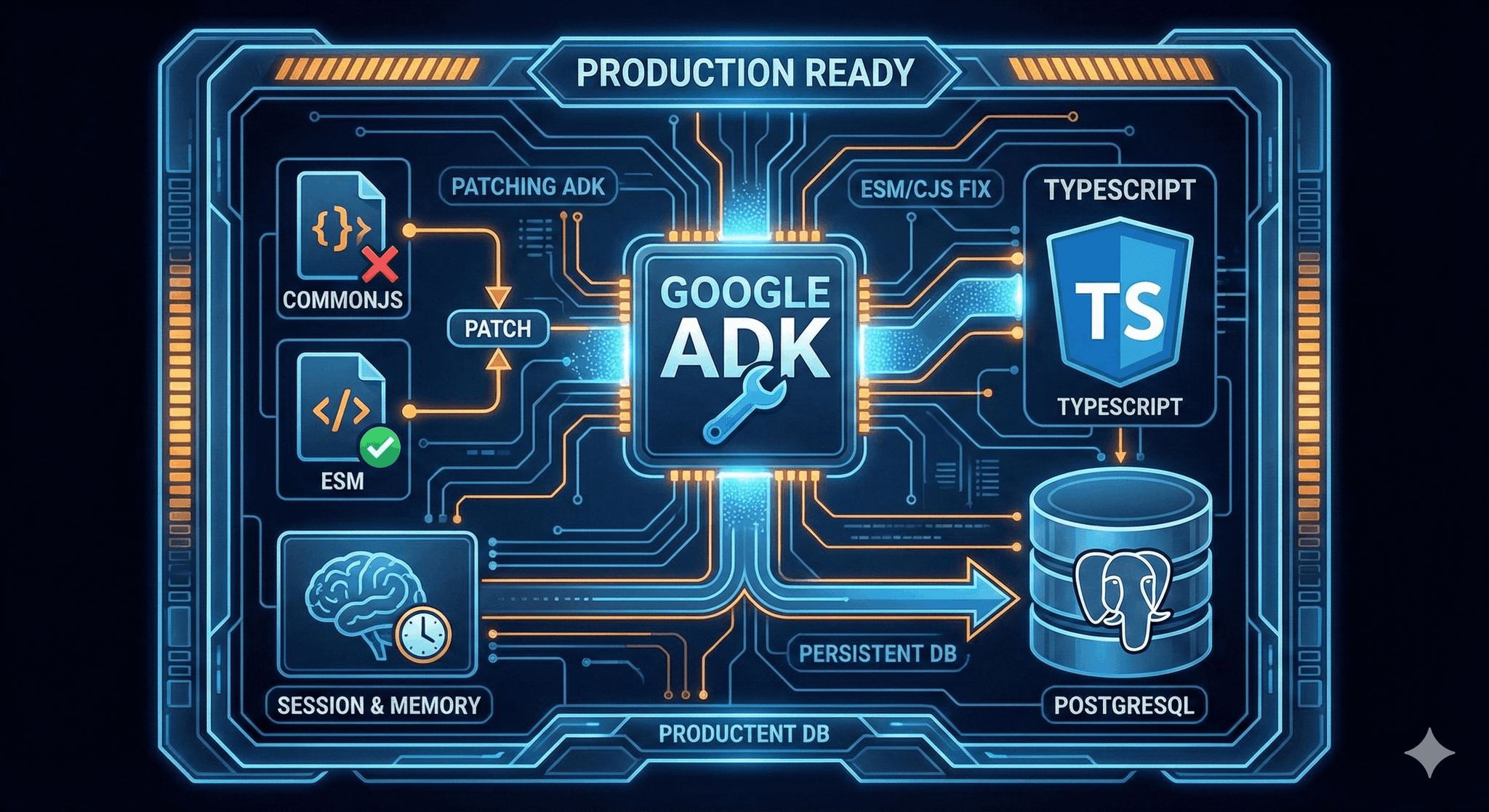
In a real-world environment, you can't let that critical state live in volatile, in-memory storage. You need true persistence so agents retain context across server restarts and container scaling. Furthermore, if you’re running a modern TypeScript stack with ESM, the currently shipped @google/adk package suffers from dependency conflicts that break standard builds.
Today, we’re going to fix this. We'll walk through patching the ADK to bridge the ESM/CommonJS gap and implementing custom PostgreSQL-backed session and memory services to ensure that state is saved durably. It’s a deep dive, but essential for anyone moving beyond the "Hello World" phase.
Here's the GitHub repo with complete code examples you can refer from: tutorial repository
The Current Limitations
For production TypeScript applications, the current ADK falls short in three key areas:
- Lack of Persistence: The provided examples use in-memory services. Server restarts mean lost user context.
- ESM/CJS Conflicts: The published package's CommonJS build incorrectly imports the ESM-only
lodash-espackage, rather than standardlodash, breaking many build pipelines. - Missing Infrastructure: Unlike the Python SDK, the TypeScript version lacks built-in persistent session services (like VertexAI) out of the box.
We will resolve these issues using NestJS, TypeORM (PostgreSQL), and pnpm package manager for patching.
Hands-On: Building a Persistent ADK Agent
We are going to implement a CloudSqlSessionService and a CloudSqlMemoryService. This ensures your agent's state and long-term memories live safely in your Postgres database rather than ephemeral RAM.
1. Patching @google/adk
The first step is stabilizing the dependency tree. As mentioned, the @google/adk package currently ships a CommonJS build that incorrectly imports lodash-es. We need to patch this to get it running in a modern environment.
Ensure you have pnpm installed, then run (I assume here that you already have this dependency included in your project):
pnpm patch @google/adk
Open the temporary directory pnpm provides (it'll be printed out in your terminal) and make two changes:
- In
package.json, add the standardlodash(CommonJS) to dependencies, matching the version of the existinglodash-esentry. - In
dist/cjs/index.js, do a find-and-replace: change all instances of'lodash-es'to'lodash'.
Here's my package.json example:
{
  "dependencies": {
    "@google/genai": "^1.37.0",
    "@modelcontextprotocol/sdk": "^1.24.0",
    "google-auth-library": "^10.3.0",
    "lodash-es": "^4.17.22",
    "lodash": "^4.17.22", <----- This change here. Also ensure version numbers match for lodash-es (above) and lodash.
    "zod": "3.25.76"
  }
Apply the fix:
pnpm patch-commit <path-to-temp-dir>
Note: You can find the already-patched version in the tutorial repository if you want to skip this step.
2. The Webpack Shim (For NX/Webpack users)
If you are using Webpack (or NX), you need to configure it to handle mixed module types. Since your project is likely ESM, but the patched ADK package is CJS, your webpack.config.cjs (you should have a webpack.config.js file if your project is commonjs) needs explicit handling for output formatting to ensure Node runs it correctly.
// Key configuration: Save output as .cjs to run as a CommonJS module while maintaining TS paths (if your project is esm), otherwise, use .js
config.output = {
  ...config.output,
  // ensure the output is treated as commonjs
  filename: '[name].cjs',
  chunkFilename: '[name].chunk.cjs',
};
3. Implementing Persistent Sessions
Before we go to the actual meat of the implementation, I'll briefly explain the database entities and how they map to Google ADK types (feel free to skip this section if this is of no interest to you).
The Persistence Schema: Mapping ADK to PostgreSQL
You'll need a database schema that mirrors the ADK's internal logic. Using TypeORM, we define three primary entities: Sessions, Events, and Memories.
The Session Entity
The SessionEntity acts as the root. It tracks the overall state (the short-term memory) and metadata like appName and userId. This ensures that even if your server instances cycle, the agent knows exactly where it left off with a specific user.
import { BaseEntity } from '@app/common/lib/entities/base.entity.mjs';
import { Column, Entity, OneToMany, Index } from 'typeorm';
import { EventEntity } from './event.entity.mjs';

@Entity('adk_sessions')
export class SessionEntity extends BaseEntity {
  @Column({ type: 'varchar', length: 100 })
  @Index({ unique: true })
  sessionId: string; // The ADK session identifier (e.g. phone_YYYY-MM-DD)

  @Column({ type: 'varchar', length: 255 })
  appName: string;

  @Column({ type: 'varchar', length: 255 })
  userId: string; // The phone number identifier

  @Column({ type: 'jsonb', default: {} })
  state: Record<string, unknown>;

  @Column({ type: 'bigint' })
  lastUpdateTime: number;

  @Column({ type: 'boolean', default: false })
  isSummarized: boolean; // To avoid re-summarizing already summarized sessions.

  @OneToMany(() => EventEntity, (event: EventEntity) => event.session, { cascade: true })
  events: EventEntity[];
}
The Event Entity
Every interaction, whether it’s a user message, an agent response, or a tool execution, is an event. Notice the actions and content columns are jsonb. This is because ADK events are complex objects; storing them as JSON allows us to preserve the full payload without creating dozens of narrow columns.
import { Column, Entity, JoinColumn, ManyToOne, type Relation } from 'typeorm';
import { SessionEntity } from './session.entity.mjs';
import { BaseEntity } from '@app/common/lib/entities/base.entity.mjs';

@Entity('adk_events')
export class EventEntity extends BaseEntity {
  @Column({ type: 'varchar', length: 150, unique: true })
  eventId: string; // Global Event ID provided by ADK

  @ManyToOne(() => SessionEntity, (session) => session.events, { onDelete: 'CASCADE' })
  @JoinColumn()
  session: Relation<SessionEntity>;

  @Column({ type: 'jsonb' })
  actions: Record<string, unknown>; // Stores the full ADK Event object

  @Column({ type: 'varchar', length: 255 })
  invocationId: string;

  /**
   * Represents the entity that generated the event.
   * "user" - for input from the human user
   * "Agent Name" - (e.g. "General Agent") for output from a specific AI agent
   */
  @Column({ type: 'varchar', length: 255, nullable: true })
  author: string;

  @Column({ type: 'bigint' })
  timestamp: number;

  @Column({ type: 'varchar', length: 255, nullable: true })
  branch: string;

  @Column({ type: 'jsonb' })
  content: Record<string, unknown>; // Stores the full ADK Event object
}
The Memory Entity
Finally, the MemoryEntity handles long-term persistence. The key column here is embedding, which uses the vector type. This is what allows your agent to perform semantic searches over thousands of past interactions to find relevant historical context.
import { Column, Entity, Index } from 'typeorm';
import type { Content } from '@google/genai';
import { BaseEntity } from '@app/common/lib/entities/base.entity.mjs';

@Entity('adk_memories')
export class MemoryEntity extends BaseEntity {
  @Column({ type: 'varchar', length: 255 })
  @Index()
  userId: string;

  @Column({ type: 'varchar', length: 255 })
  @Index()
  appName: string;

  @Column({ type: 'jsonb' })
  content: Content;

  @Column({ type: 'varchar', length: 255, nullable: true })
  author: string;

  @Column({ type: 'bigint' })
  timestamp: number;

  @Column({ type: 'vector', length: 768, nullable: true })
  embedding: number[];
}
Actual Implementation: The Services Layer
We need a custom SessionService that persists state to PostgreSQL via TypeORM.
Critical Implementation Detail: When overriding the appendEvent method in your custom service, you must call super.appendEvent({ session, event }) first.
This call registers the incoming event with the ADK framework's current in-memory execution context for the active "turn." If you omit this, the framework won't recognize that an event occurred, even if you successfully save it to your database.
Here's a code snippet of my implementation (you can find the full code example in the project repo):
export class CloudSqlSessionService extends BaseSessionService {
  override async appendEvent({ session, event }: AppendEventRequest): Promise<Event> {
    // 1. Essential: Tell the ADK framework something happened in this turn
    await super.appendEvent({ session, event });

    // 2. Fetch current session state from DB
    const sessionEntity = await this.sessionsRepository.findOne({
      where: { sessionId: session.id },
    });

    // 3. Create event entity
    const eventEntity = this.eventsRepository.create({
      /* ... mapping logic ... */
    });

    await this.eventsRepository.save(eventEntity);

    // 4. Persist the updated state delta to Postgres
    await this.sessionsRepository.update(sessionEntity.id, {
      state: updatedState,
      lastUpdateTime: Date.now(),
    });

    return event;
  }
}
4. Long-Term Memory (Vector Search)
For long-term recall across different sessions, we implement a CloudSqlMemoryService. This utilizes pgvector within PostgreSQL for similarity search and Gemini’s text-embedding-004 model for generating embeddings.
Important: You MUST enable the pgvector extension in postgres. Refer to this link on how to install this extension: installation instructions, then enable it by running this command:
CREATE EXTENSION IF NOT EXISTS vector;
Here's the code example for saving and searching your long term memory (again, the full code example is available in the project repo):
export class CloudSqlSessionService extends BaseSessionService {
  async addSessionToMemory(session: Session): Promise<void> {
    console.info(`------------- Adding session ${session.id} events (total events: ${session.events.length}) to memory for user ${session.userId} -------------`);

    for (const event of session.events) {
      console.log('event: ', event);
      console.log('event.content: ', event.content);
      const textContent = stringifyContent(event).trim();
      console.log('textContent: ', textContent, '\n\n');
      if (!textContent) {
        continue;
      }

      try {
        const embedding = await this.generateEmbedding(textContent);

        const memory = this.memoryRepository.create({
          userId: session.userId,
          appName: session.appName,
          content: event.content,
          author: event.author || 'unknown',
          timestamp: event.timestamp,
          embedding: embedding,
        });

        await this.memoryRepository.save(memory);
      } catch (e) {
        console.error(`Failed to generate embedding for event in session ${session.id}: ${e.message}`, e);
      }
    }
  }

  /**
   * Searches for relevant memories using vector similarity.
   */
  async searchMemory(request: SearchMemoryRequest): Promise<SearchMemoryResponse> {
    const { appName, userId, query } = request;

    try {
      const queryEmbedding = await this.generateEmbedding(query);
      const vectorStr = `[${queryEmbedding.join(',')}]`;

      // Use pgvector's cosine distance operator <=>
      const results = await this.dataSource.query(
        `SELECT id, content, author, timestamp
         FROM adk_memories
         WHERE "userId" = $1
           AND "appName" = $2
         ORDER BY embedding <=> $3
           LIMIT 5`,
        [userId, appName, vectorStr],
      );

      const memories: MemoryEntry[] = results.map(r => ({
        content: r.content,
        author: r.author,
        timestamp: r.timestamp,
      }));

      return { memories };
    } catch (error) {
      console.error(`Failed to search memory: ${error.message}`, error);
      return { memories: [] };
    }
  }

  /**
   * Generates an embedding for the given text.
   */
  private async generateEmbedding(text: string): Promise<number[]> {
    const response = await this._genAI.models.embedContent({
      model: 'text-embedding-004',
      contents: [text],
    });
    if (!response.embeddings || response.embeddings.length === 0) {
      throw new Error('No embeddings returned from API');
    }
    return response.embeddings[0].values!;
  }
}
5) Giving the Agent a "Memory" Tool
With your CloudSqlMemoryService in place, you need a way for the agent to actually trigger a search. In the ADK, this is done by defining a FunctionTool. This tool acts as the bridge between the LLM’s reasoning and your vector database.
When the agent realizes it lacks specific historical context (e.g., "What did we discuss about the project architecture last month?"), it will call this load_memory tool.
import { FunctionTool } from '@google/adk';
import { z } from 'zod';

/**
 * A built-in tool that allows agents to load relevant long-term memories.
 */
const loadMemoryTool = new FunctionTool({
  name: 'load_memory',
  description: 'Loads relevant long-term memories for the current user based on a query.',
  parameters: z.object({
    query: z.string().describe('The search query for memory.'),
  }),
  execute: async ({ query }, toolContext) => {
    if (!toolContext) {
      throw new Error('Tool context is missing');
    }
    // The ADK passes the active MemoryService via toolContext
    return await toolContext.searchMemory(query);
  },
});

export default loadMemoryTool;
Why toolContext is Key
Notice that we don't import the memory service directly into the tool. Instead, we pull it from the toolContext. This is an architectural win: it keeps your tools decoupled from specific database implementations and ensures that the search is automatically scoped to the correct userId and appName currently active in the session.
6) Orchestrating the Agent (The "General Agent" Factory)
Now that we have our persistent services and our load_memory tool, we need to wire them into the agent. In a production NestJS or Express environment, you’ll often want to pass external dependencies (like database connections or configurations) into your agent definition.
A clean way to do this is by using a factory function. This allows you to inject your MainContext directly into the agent and its sub-agents.
import { LlmAgent } from '@google/adk';
import loadMemoryTool from '../load-memory.tool.mjs';

// Factory function to inject context and dependencies
export default function generalAgent(context: MainContext) {
  return new LlmAgent({
    name: 'general_agent',
    model: 'gemini-1.5-pro', // Use your preferred model constant
    instruction: `
  **Identity:**
  You are SkyCast, a helpful weather assistant.
  **Current Date and Time:** {current_datetime}

  **Long-term Memory:** You can access the user's favorite locations and past queries by calling the \`load_memory\` tool.

  **User profile:** {user:profile?}
  Use this to identify the user's home city or preferred units.

  **Core Responsibilities:**
  1. **Triage & Routing:** Route users to specific sub-agents (user, forecast, or alerts).
  2. **Memory Retrieval:** Proactively check memory for saved preferences if the user is vague.
  `,
    tools: [loadMemoryTool],
    // Sub-agents receive the same context for consistent behavior
    subAgents: [userAgent(context), forecastAgent(context), alertsAgent(context)],
  });
}
Why This Structure Wins
- Recursive Context: By passing
contextintosubAgents, every agent in the hierarchy shares the same understanding of the user's session and database connection. - Dynamic Instructions: Notice the placeholders like
{current_datetime}and{user:profile?}. The ADK fills these in at runtime, giving the LLM immediate "short-term" context before it even decides to call the "long-term"load_memorytool. - Agent Handoffs: The
subAgentsarray defines the "routing" capabilities. If the user asks to register, the General Agent handles the handoff to theuser_agentautomatically based on your routing rules.
Architectural Benefits
By moving off the default in-memory implementations and using a factory pattern for orchestration, we gain several production advantages:
- Stateless Application Tier: Offloading state to PostgreSQL means your application containers can scale horizontally without losing track of a user's progress.
- Session Durability: User context survives deployments, crashes, or server restarts.
- Complex Multi-Agent Logic: The factory pattern allows you to build a sophisticated "brain" that delegates specialized tasks (like weather alerts or billing) while maintaining a single source of truth for user memory.
Wrapping Up
By patching the ADK's module issues, implementing database-backed services, and orchestrating your agents through a clean factory pattern, you move from a prototype to a production-ready system. The result is a robust backend that handles state correctly, regardless of infrastructure churn.